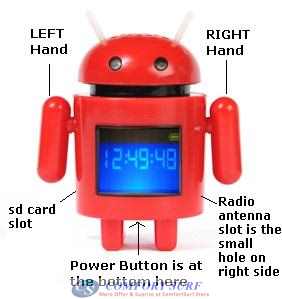
MP3 Speaker Manual
Important note: Please push the
android Hands gently.
To Change Language
- Switch on the button at the bottom of the speaker
- Push the android RIGHT Hand to Back or Front to select
menu. Please go to 系统设置,
then push the android LEFT Hand to Back to select the menu.
- Push the android RIGHT Hand to point 语言选择,
push the LEFT Hand to Back to select the menu.
- Point to
英文and push LEFT Hand to back to select language to English
To Listen Song from SD Card
Please copy the MP3 or WMA to root of the sd card.
- Insert the sd card into the android speaker.
- Push the RIGHT Hand to choose the Music function
- Then now android will start play Music from sd card
- RIGHT Hand: Push to back to open Menu, push to front to
Play or Pause the song
- RIGHT Hand: Long Push to Back to Exit the Music
function. Long Push to Front enter StandBy mode
- LEFT Hand: Push to back to front to play Next or
Previous song
- LEFT Hand: Long Push to Back to Increase Volume. Long
Push to Front to Decrease Volume
To Listen to Radio
- Please insert the antenna cable into the Android body
small hole.
- Tips: You are no need to insert the antenna very deep
into the hole, you can adjust the cable little in and out to control the radio
reception
- Push the RIGHT Hand to choose the FM Radio function
- Push the LEFT Hand to choose the radio FM
- Push the RIGHT Hand to Back to open FM Radio Menu.
- To control Volume, please push the RIGHT Hand to Back to
open Menu, then use LEFT Hand to select the Volume menu.
Others functions please study at your end.


