LATEST
4GB New Super High Definition
SPY Video Hidden Camera Watch Mini DVR
Video Resolution:
1280*960 VGA
Picture Format: 3264*2448
(8M Pix)
Multi-functional
Elegant Design Watch
Stainless Steel / Quality Watch
High definition Video/Picture ever
Built in 4GB
As a pendrive data storage
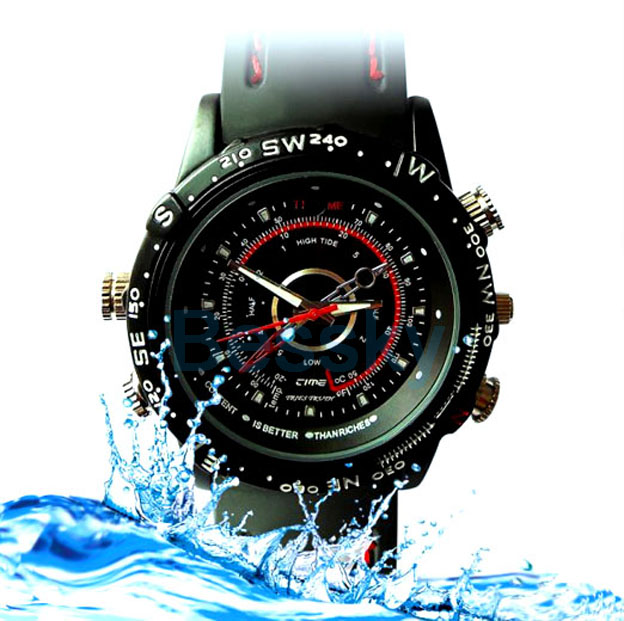
Real time recording, never
let memorable moments sneak away from life!
*Video Recording with
voice & Take a Photo
|
Presenting sheer elegance and beauty from a smart spy camera wrist
watch. This spy camera watch can be worn with both casual and smart
evening wear - whether you are on the hunt for a good story or just
want to wear a classy watch for the day. This surveillance watch has an
audio and video recording camera built into its classy face and
contains a huge 4 GB's of flash memory for hours of storage.
|
|

|
The watch is an elegantly designed full metal watch with a glass face
cover and has accurate gear driven time in seconds, minutes and hours.
With a back clasp design for easily taking the watch on and off and a
twisting crown for time adjustment, its made as a well as an designer
timepiece, but has a secret camera that is available whenever the need
arises. It has never been easier to record hours of surveillance in
computer ready AVI format. This is the best way to record all your
encounters, interviews, meetings and on the scene discussions without
anyone knowing what you are doing.
This is an elegant DVR "spy watch" solution for the professional
investigator or citizen journalist. All the features of this 4GB Spy
Watch are packed into a compact size no larger than a regular high
class wristwatch while being able to store hours of in the field video
footage ready to be transferred to your computer when you get home.
This fantastic gadget is in stock now and available to you at a factory
direct wholesale price from the leader in wholesale electronics.
|


|
|
| Item |
Parameters |
| Video format |
AVI |
| Video encoding |
M-JPEG |
| Video resolution |
1280*960VGA |
| Video frame rate |
30fps |
| Media playing software |
Attached software of the operating system or
Mainstream audio and video media playing software |
| Picture format |
JPG |
| Picture pixels |
3264*2448
(8M
Pix) |
| The ratio of image |
4:3 |
| Supporting system |
Windows me/2000/xp/2003/vista;Mac O/S;Linux; |
| Battery capacity |
200mAh |
| Memory |
4GB Built
in |
| Charging voltage |
DC-5V |
| Interface type |
?2.5 ?4 Pin USB |
| Storage support |
Nand flash |
| Battery type |
high-capacity lithium polymer |
|
|
Package includes:
1 x Multi-Functional Spy watch (4G built-in)
1 X USB Cable
1 x user Manual
1 x Software in watch built-in Memory

Operating
:
a. Parts Description:
a.1 Indicator: Status Indicator (7): blue light is the photo taking
mode; red light for the video recording mode.
a.2 Button(4): Touch the button for the start.
a.3 Socket(1): The 2.5 - 4 pin USB socket is used to connect with
computer or charger. It is the interface for data transfer and charging.
a.4 Microphone and camera: Microphone (2) is used to get the sound
signal ;(3) is used to get the image signal.
a.5 Time setting: It is to set the time of this watch.
b. ON/OFF: Press button (4) for 2 seconds to start the
device. It gets into the photo recording mode. Meanwhile the blue light
indicator is on.
c. Take photo: In the photo-taking mode, the device
enters into the standby status for photo-taking. Now the blue light is
on. Press the button (6) for 1 second. One flashing blue light
indicates that the device completes the photo taking and file saving
job. Then it returns to the standby mode.
Note: Make sure there is adequate light in the surrounding and the
camera is not blocked by other items. Keep the camera upright and
stable. And the object should be more than 50cm from the camera.
d. Record video: In the photo mode , long press
operation button 2 seconds, the camera into the video mode , this time
the red light flashes, in order to save system power and began
recording in about 3S bell, the status indicator light will
automatically switch off, this time the video is still at the video
mode , and if the state recognized the camera, or a new operation,
briefly press the operation button once to stop recording, save the
file, this time to resume a long bright blue light.
e. Record sound:sart state, a long bright blue light,
short the switch machine key (Figure 4), blue light began to blink, in
order to save system power and began recording in about 3S bell, the
status indicator light will automatically switch off, short the switch
machine to save the and enter the camera recording standby mode, this
time a long bright blue light
f. PC camera: Hold down the Operation button (Figure
6), you can connect the device with computer USB interface, you can
enter the PC Camera (webcam) mode. In this mode, your camera can be
used as a PC camera, with your friends online video chat, take photos,
and so on.
Note: According to the computer system configuration or difference, the
computer may not detect a camera function by once, if the computer can
not enter the camera function, but into a Udisk. Please remove the
camera and connect the camera to the computer again; If you are the
first time to use the PC camera function on your computer, please
install the drivers on the CD or dealers provided. Please connect the
data cable to the device at first, then connect the other side to the
Computer.
g.Connect the computer: In standby or OFF mode, you
can connect the device with the computer. The computer will pop up a
removable disk logo. There is an image file directory for: * Disk _REC
100MEDIA. During video recorder and computer transfer data, the blue
light flashes rapidly. For the disconnection, please click "SAFELY
REMOVE HARDWARE" on the right bottom corner of the task bar. Then click
to stop the "USB mass storage device". Unplug the USB. The
disconnection completes.
Note: According to the computer or system configuration, there will be
slight difference for the time of identifying removable disk. Please be
patient. During this period, please do not press the button to avoid
the bad impact of computer hardware. If the computer does not identify
the removable disk long time, disconnect and reconnect the device. If
the computer is unable to identify the hardware yet, make sure your
operating system, driver and USB cable are all in normal condition.
Please make sure to disconnect the device in accordance with the normal
process to avoid the possible damage for computer and recorder.
h.Charge: Connect to computer USB interface or
charger. During the charging, the red light flashes slowly. When the
battery is fully recharged, the red light stops flashing.
Note: The recorder is with built-in high-capacity lithium polymer
battery. The battery is with no memory effect. It can be used and
charged at anytime. But for the initial five times of charging, please
charge battery to saturation after the battery runs out. It is to
activate the battery maximum capacity and maintain the standard working
time.
Note:
Shipping will charged as a handling as well for self collect.