ITEM
DESCRIPTIONS:
ZTE MF30 WiFi hotspot is a 3.5G mobile hotspot device,
working in GSM/GPRS/EDGE/WCDMA/HSPA network. The client device could
connect to it via USB or Wi-Fi interface. With HSDPA 7.2Mbps downlink,
quad-band GSM and tri-band UMTS, it gives maximum 5 users super fast
Internet experience all over the world at the same time.
It runs on battery and has a mini USB port and a
built-in LED Indicator on the top and could supports up to 32GB Micro
SDHC memory. The device supports data and SMS services, enabling you to
communicate anytime and anywhere.

Quick Overview
* HSPA+ peak
speed up to 7.2 Mbps
* Maximum support 5 users to get internet access
* 802.11b/g Wi-Fi
* Small, lightweight design
* ZTE MF30 3G Router supports up to 32GB microSD card
* Auto APN
* SMS Via Wifi and Phonebook management


Auto APN Setting..
Just plug in SIM and GO..
SMS Via Wifi and Phonebook
Management..

Highlight:
* This HSPA device is peak rated at 7.2 Mbps downlink speed.
* Operates on the 3G networks for wireless access to
e-mail and internet on the move.
* Use 802.11b/g Wi-Fi connection so no installation is
required. Simply enter the password key supplied and get on
line immediately with your SIM.
* Small, light weight design.
* Supports three working modes: USB Mode, Wi-Fi Mode,
Mixed Mode.
Specification:
Data service:
* HSDPA/HSUPA/UMTS
2100 MHz
* GSM/GPRS/EDGE 850/900/1800/1900 MHz
* HSPA+: DL 7.2Mbps, UL 5.76Mbps
* WCDMA CS: 64Kbps UL/DL
* WCDMA PS: 384Kbps UL/DL
Interface: USB and Wi-Fi
* Wi-Fi Standard: 802.11b/g/n
* Wi-Fi Security: WEP/WPA/WPA2/WAPI
* USB Version: USB 2.0 high speed
* USB Interface Type: Micro USB
* MicroSD card: ZTE MF30 supports up to 32GB microSD card
Battery:
* Power Adapter: 5V/700m A Battery: 1500mAh
* Standby time: 100 hours
* Working time: 4 hours
Features:
* Weight 65g
* Dimensions (W×H×D): 99.7mm*53.7mm*13.9mm
Other
requirements:
* Operating temperature: 0?~+35?
* Storage temperature: -20?~+50?Charging
temperature: 0?~45?
* Operate System: Windows 7, Windows Vista(32bit or
64bit), Windows XP(SP2 or later), MAC(10.4 or later)
* Web Brower: IE(6.0 or later), Firefox(2.0 or later),
Opera(10.0 or later), Safari(4.0 or later), Chrome(5.0 or later)
Notes:
The ZTE MF30 hotspot's standby and working time are only
for you reference, and based on ideal working environment.

Getting to Know the Device
The following figure shows the appearance of the device.
1. Power: Hold the Power button to switch on/off the device
2. Memory card slot (microSD card): it is where you
insert the memory card(MicroSD card)
3. WPS:
a. This button is used to start/end Wi-Fi
Protected Setup authentication process and enable/disable the Wi-Fi
function
b. Hold it for 3 seconds to activate the
WPS function
c. When the WPS function is available,
press it to deactivate the WPS function
d. Press it to enable/disable Wi-Fi function
4. LED Indicator: It indicates the signal type, signal
strength, battery, Wi-Fi, etc.
5. Charger/USB port:
a. Charge your device.
b. Connect the client to your device via
USB cable.
Notes: Hold the WPS and Power buttons
simultaneously until the LED screen turns off, and then release the
buttons. The ZTE MF30 3G Router will restart automatically and restore
to the factory default settings.
Working Mode: ZTE MF32 3G Router
supports three working modes: USB Mode, Wi-Fi Mode, Mixed Mode.
USB Mode: Connect to the device with
the USB cable.
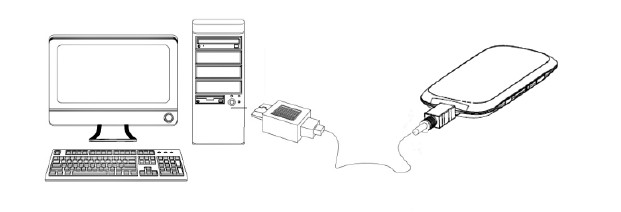
Wi-Fi Mode: Connect to the device via
Wi-Fi
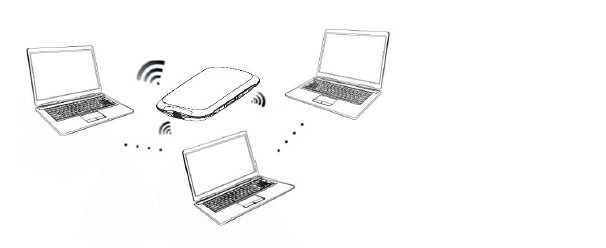
Mixed Mode: Connect to the device with
the above two connection methods
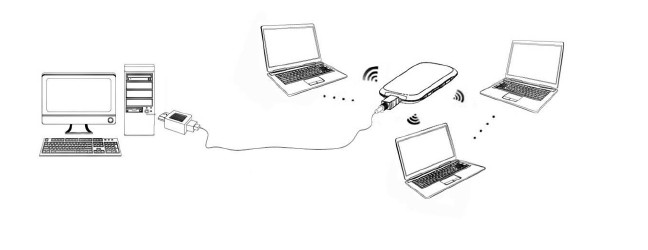
Notes: If you want to connect to the
Internet by using ZTE MF32 Wi-Fi mode, make sure that the client
supports the Wi-Fi function
Note:
BRAND NEW Still Sealed
From ZTE.. But We will open to put the warranty sticker.
6
Months Warranty On Manufacturer defects.
Optional
Upgrade to 1 Year add RM29 Only. (Just add to total and remark to us
"Upgrade 1 year")
Package
Content:
1 x ZTE MF30 Mifi Router
1 x Battery
1 x Manual
1 x Charger
1 x USB Cable
1 x Receipt

Thanks for visit.
|